DevOps has fundamentally changed how software teams build, test, and ship products. But to truly leverage its power, you need to understand what happens behind the scenes in the DevOps lifecycle. Companies adopting DevOps have reported up to 50–75% reduction in time-to-market, according to research McKinsey & Company.
This guide breaks down every phase, stage, tool, and best practice you need to know, especially if you’re considering DevOps development services improving speed, collaboration, and release quality.
What’s in This Guide
| Topic | What You’ll Learn |
| What Is the DevOps Lifecycle? | Definition, meaning, and why it matters |
| DevOps Lifecycle Diagram | Visual map of all 8 stages in the continuous loop |
| Phases & Stages | Plan → Code → Build → Test → Release → Deploy → Operate → Monitor |
| The 7 Cs of DevOps | The seven continuous practices that power the lifecycle |
| DevOps Lifecycle Tools | Stage-by-stage tool stack from Git to Grafana |
| DevOps vs Traditional SDLC | How DevOps rewrites the old software development model |
| DevOps for Business Agility | Why the lifecycle is a competitive strategy, not just a tech choice |
| Azure DevOps Lifecycle | How Microsoft’s platform covers every stage end-to-end |
| Best Practices & Steps | Actionable tips to run a high-performing DevOps pipeline |
What Is the DevOps Lifecycle? (DevOps Lifecycle Explained)
The DevOps lifecycle is a continuous, iterative process that integrates software development (Dev) and IT operations (Ops) into a unified workflow. Rather than treating development and deployment as separate silos, the lifecycle of DevOps brings them together through automation, collaboration, and continuous feedback, enabling teams to deliver high-quality software faster and more reliably.
But what is meant by DevOps lifecycle? Simply put, it’s the end-to-end framework that governs how code moves from an idea in a developer’s head to a live feature in a user’s hands and then loops back again through monitoring and feedback.
The lifecycle is continuous loop, often visualized as an infinity symbol (∞), representing the never-ending cycle of planning, building, testing, deploying, and improving. This is where DevOps automation consulting services become valuable, helping teams automate repetitive tasks, reduce errors, and scale these processes efficiently.
The diagram above illustrates the DevOps lifecycle as a continuous, infinity-shaped loop -development phases on the left, operations phases on the right, with a feedback arrow looping monitoring insights back into planning.
DevOps Software Development Lifecycle: How It Differs from Traditional SDLC
The traditional software development lifecycle (SDLC) follows a sequential path that covers requirements, design, development, testing, deployment, and maintenance. Each phase hands off to the next like a relay race, which works fine until something breaks downstream and everyone’s pointing fingers.
Instead of passing work from one team to another, DevOps brings everyone together to work side by side Key differences include:
- Continuous integration and delivery replace long release cycles
- Shared ownership between dev and ops replaces handoffs
- Automated testing and monitoring replace manual quality gates
- Feedback loops are built in from day one, not bolted on at the end
This shift is why companies that adopt DevOps ship code significantly faster, with dramatically lower failure rates, compared to those still running traditional SDLC models.
DevOps Lifecycle Diagram: Visualizing the Infinite Loop
A DevOps lifecycle diagram typically shows an infinity loop (∞) divided into two halves:
- Left loop (Dev side): Plan → Code → Build → Test
- Right loop (Ops side): Release → Deploy → Operate → Monitor
The two loops connect at a central point representing the integration between development and operations. Arrows flow continuously in both directions, emphasizing that feedback from monitoring directly informs the next planning cycle.
This diagram isn’t just decorative. It’s a mental model. Every time your team wonders “whose job is this?” -refer back to the loop. Everything belongs to the loop.
DevOps Lifecycle Phases (Phases of DevOps Lifecycle)
The phases of the DevOps lifecycle are the broad functional categories that structure how work flows through the system. Most models recognize 8 core phases:
- Plan: Define requirements, user stories, and sprint goals
- Code: Write and version-control the application code
- Build: Compile code and package it into deployable artifacts
- Test: Validate functionality, performance, and security
- Release: Approve and schedule the build for deployment
- Deploy: Push the release to production or staging environments
- Operate: Manage infrastructure, configurations, and uptime
- Monitor: Collect metrics, logs, and user feedback
These phases feed into each other continuously -monitor informs plan, plan shapes code, and so on. The DevOps lifecycle stages essentially map to the same framework, just described from a workflow perspective rather than a functional one. Stages emphasize the progression of a code change; phases emphasize the type of activity being performed.
DevOps Lifecycle for Business Agility
One of the most compelling arguments for DevOps adoption isn’t technical; it’s business. The DevOps lifecycle for business agility represents the organizational ability to respond to market changes faster than competitors.
Here’s what that looks like in practice:
Faster time-to-market: Continuous delivery means features ship in days, not months. When a competitor launches something new, you can respond quickly rather than waiting for your next quarterly release.
Reduced risk per release: Smaller, more frequent releases mean smaller blast radii when something goes wrong. Instead of massive, high-stakes deployments, you’re making incremental changes that are easy to roll back.
Data-driven decisions: The monitoring phase generates real user data that feeds back into planning. You stop guessing what customers want and start building what the data shows they actually use.
Cost efficiency through automation: Manual testing, manual deployments, and manual infrastructure provisioning are expensive. Automating these through the DevOps lifecycle frees up engineering time for value-generating work.
Cross-team alignment: When dev and ops share the same lifecycle and metrics, organizational friction drops. Fewer escalations, fewer blame games, faster resolution times.
For business leaders evaluating DevOps investment, the lifecycle isn’t a technical detail, it’s the operational blueprint for competitive advantage. To fully realize these benefits, many organizations choose to hire DevOps engineers who can implement, manage, and continuously optimize this lifecycle.
DevOps Lifecycle Steps: A Deeper Look at Each Stage
Understanding the DevOps lifecycle steps at a granular level helps teams implement them effectively rather than treating them as abstract concepts.
Step 1: Plan
Teams use agile methodologies-sprints, backlogs, user stories to define what gets built and why. Tools like Jira or Azure Boards track progress and keep everyone aligned on priorities.
Step 2: Code
Developers write code in feature branches and use version control systems (Git being the standard) to manage changes. Code reviews happen here, catching issues before they ever touch a pipeline.
Step 3: Build
CI/CD tools automatically compile code, resolve dependencies, and produce build artifacts every time code is pushed. A failed build is an immediate signal fix it before moving on.
Step 4: Test
Automated tests run against every build, unit tests, integration tests, regression tests, and performance tests. The goal is to catch bugs as early and cheaply as possible.
Step 5: Release
Release management involves versioning, change approvals, and scheduling. In mature DevOps environments, this step is highly automated with human approval gates only for critical changes.
Step 6: Deploy
Deployment automation pushes code to environments (dev, staging, production) using infrastructure-as-code and container orchestration. Blue-green deployments and canary releases minimize downtime risk.
Step 7: Operate
Operations teams (or increasingly, platform engineering teams) manage cloud infrastructure, ensure uptime SLAs, handle incident response, and maintain configuration standards.
Step 8: Monitor
Observability platforms collect logs, metrics, and traces. Alerting systems notify teams of anomalies. This data loops back to planning, completing the cycle.
The 7 Cs of DevOps Lifecycle
The 7 Cs of DevOps lifecycle is a framework that captures the core principles driving each phase. These aren’t just technical checkboxes, they’re cultural commitments.
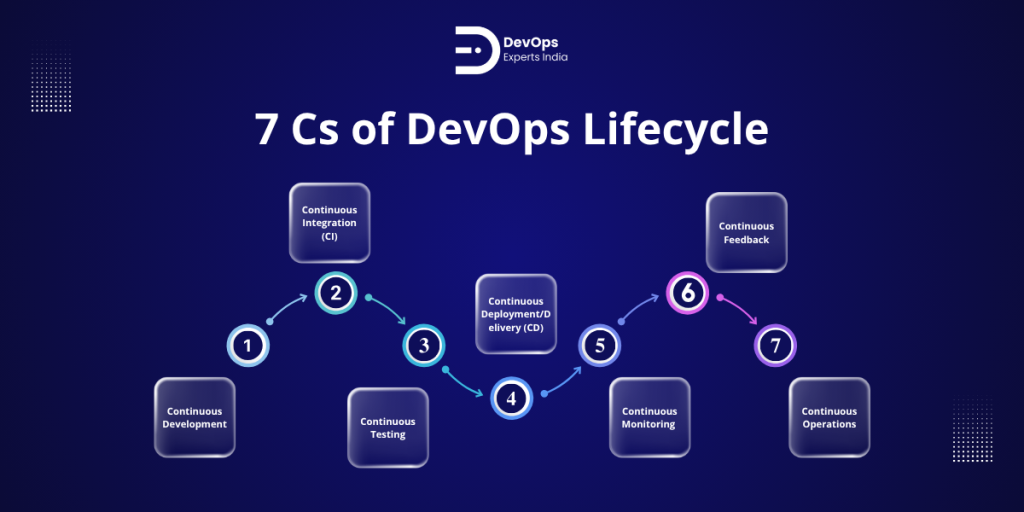
- Continuous Development: Code is written and committed continuously, not in massive batches. Small, frequent commits reduce integration complexity and keep the team moving forward.
- Continuous Integration (CI):Every code commit triggers an automated build and test cycle. The goal is to detect integration issues within minutes, not weeks.
- Continuous Testing: Testing isn’t a phase that happens after development; it happens during development. Automated test suites run at every stage of the pipeline, with shift-left practices pushing testing earlier in the lifecycle.
- Continuous Deployment/Delivery (CD):Continuous delivery means every passing build is ready to deploy. Continuous deployment goes further; passing builds are automatically pushed to production without manual intervention.
- Continuous Monitoring: Production systems are instrumented with real-time observability tools. Teams don’t wait for users to report problems, they detect and respond to issues proactively.
- Continuous Feedback: Feedback flows both from technical monitoring data and from users. This includes crash reports, feature usage analytics, support tickets, and A/B test results.
- Continuous Operations: Operations practices are automated and codified. Infrastructure is treated as code, enabling teams to provision, scale, and tear down environments programmatically.
These 7 Cs aren’t sequential, they operate simultaneously, reinforcing each other across the lifecycle.
Azure DevOps Lifecycle: Microsoft’s End-to-End Platform
Azure DevOps is Microsoft’s integrated platform for implementing the DevOps lifecycle. It covers every phase of the lifecycle through a suite of tightly integrated services:
- Azure Boards- Agile planning, sprint tracking, and backlog management (Plan phase)
- Azure Repos- Git-based version control (Code phase)
- Azure Pipelines- CI/CD automation for building, testing, and deploying to any cloud or on-prem environment (Build, Test, Release, Deploy phases)
- Azure Artifacts-Package management for storing and sharing build artifacts (Build phase)
- Azure Test Plans- Manual and exploratory testing tools (Test phase)
- Azure Monitor- Observability, alerting, and application performance monitoring (Monitor phase)
The Azure DevOps lifecycle is particularly attractive for organizations already invested in the Microsoft ecosystem (Azure cloud, Visual Studio, GitHub), as the integrations are native and deep. Azure Pipelines, for instance, supports YAML-based pipeline definitions, enabling true pipeline-as-code practices.
Azure DevOps also supports hybrid environments, you’re not locked into Azure cloud. Teams can deploy to AWS, GCP, or on-premises infrastructure using the same pipeline tooling.
DevOps Lifecycle Tools: Tools Used in DevOps Lifecycle
The right DevOps lifecycle tools can make or break your implementation. Here’s a curated breakdown by phase:
| Phase | Popular Tools |
| Plan | Jira, Azure Boards, Trello, Asana |
| Code | Git, GitHub, GitLab, Bitbucket |
| Build | Jenkins, Maven, Gradle, Azure Pipelines |
| Test | Selenium, JUnit, TestNG, Postman, SonarQube |
| Release | Spinnaker, Harness, GitHub Actions |
| Deploy | Docker, Kubernetes, Helm, Terraform, Ansible |
| Operate | Kubernetes, Chef, Puppet, AWS Systems Manager |
| Monitor | Prometheus, Grafana, Datadog, ELK Stack, New Relic |
No single tool covers the entire lifecycle (though platforms like GitLab and Azure DevOps come close). The key is selecting tools that integrate well with each other and match your team’s existing skills and infrastructure.
Toolchain integration is the real challenge. A well-chosen, well-integrated toolchain is worth far more than a collection of best-in-class tools that don’t talk to each other.
Which Is Not Part of DevOps Lifecycle?
This is a common question in DevOps certification exams and interviews: which of the following is not part of the DevOps lifecycle?
Activities or concepts that fall outside the core DevOps lifecycle include:
- Waterfall project management: Sequential, phase-gated delivery is antithetical to the continuous nature of DevOps
- Manual, siloed QA processes: Testing that happens only after development completes, in a separate team with no automation
- Change freeze periods without automation: Prolonged deployment freezes undermine continuous delivery
- ITIL heavy-change processes (without adaptation): Traditional ITIL change management, if implemented without DevOps adaptation, creates bottlenecks that conflict with the lifecycle’s continuous flow
Understanding what’s not part of the lifecycle helps teams identify and eliminate anti-patterns that slow them down.
How to Automate Testing in the DevOps Lifecycle
How to automate testing in the DevOps lifecycle is one of the most practical questions teams faces. Here’s a structured approach:
Start with unit tests. These are the fastest, cheapest, and most granular tests. Every function or method should have corresponding unit tests that run on every commit. Tools like JUnit (Java), PyTest (Python), and Jest (JavaScript) handle this layer.
Layer in integration tests. Once unit tests pass, integration tests verify that components work together correctly. These run at the build stage and catch interface-level bugs early.
Implement API testing. Tools like Postman, Rest Assured, or Karate automate validation of API contracts, critical in microservices architectures where services communicate via APIs.
Add UI and end-to-end tests. Selenium, Cypress, and Playwright automate browser-based testing. These run in staging environments before production deployments.
Integrate security testing (DevSecOps). Static Application Security Testing (SAST) tools like SonarQube or Checkmarx scan code for vulnerabilities during the build phase. Dynamic Application Security Testing (DAST) runs against deployed applications.
Use parallel test execution. Slow test suites kill pipeline velocity. Distribute tests across parallel runners to keep feedback loops tight, ideally under 10 minutes for a full CI pipeline.
Implement test results reporting. Every pipeline should publish test results in a format your team can action. Failing tests should block deployment automatically, not just generate a notification someone might miss.
The golden rule: if a human is doing it repeatedly, automate it. Testing is the highest-ROI target for automation in the DevOps lifecycle.
Best Practices for a High-Performance DevOps Lifecycle
Implementing the lifecycle is one thing. Doing it well is another. Here are proven best practices:
Shift left on everything. Testing, security, and performance validation should happen as early in the lifecycle as possible. The later you catch a bug, the more expensive it is to fix.
Treat infrastructure as code. Use Terraform, Pulumi, or CloudFormation to define infrastructure in version-controlled files. This enables consistent, repeatable environment provisioning and eliminates “works on my machine” problems.
Build for observability from day one. Instrument your applications with structured logging, metrics, and distributed tracing before they go to production after something breaks.
Embrace feature flags. Decouple deployment from release. Ship code to production with features disabled, then gradually enable them for user segments. This reduces deployment risk and enables A/B testing.
Measure what matters. Track DORA metrics- Deployment Frequency, Lead Time for Changes, Change Failure Rate, and Time to Restore Service. These four metrics are the most reliable indicators of DevOps performance.
Invest in developer experience. Slow pipelines, flaky tests, and complex local setups kill productivity. Treat the internal developer platform as a product with real users: your engineers.
Foster a blameless culture. When things go wrong (and they will), conduct blameless post-mortems focused on systemic fixes, not individual fault. Psychological safety is the foundation of high-performing DevOps teams.
Conclusion
The DevOps lifecycle isn’t a technology choice; it’s an organizational philosophy backed by a concrete operational framework. From the planning board to the production monitor, every phase connects, every tool serves the loop, and every team member owns the outcome.
Whether you’re implementing the Azure DevOps lifecycle, building out your DevOps lifecycle tools stack, or just trying to understand the 7 Cs of DevOps, the common thread is continuous improvement. Start somewhere, measure everything, automate relentlessly, and let the feedback loop do its work.
The companies winning today aren’t the ones with the best individual engineers, they’re the ones with the most effective DevOps lifecycle keeping those engineers moving fast, safely.
FAQs
Q1. What is the DevOps lifecycle? (DevOps lifecycle explained)
The DevOps lifecycle is a continuous, end-to-end process that covers everything from planning and coding to deploying and monitoring software. It breaks down the wall between development and operations teams so that software gets built faster, tested automatically, and shipped with confidence, over and over in a loop that never really stops.
Q2. What is meant by the DevOps lifecycle?
Simply put, it means treating software delivery as a cycle, not a straight line. Instead of handing work from one team to another in stages, everyone collaborates across a shared pipeline — from the first line of code all the way to production monitoring. The “lifecycle” part just means this process repeats continuously with every new feature, fix, or update.
Q3. Which of the following is NOT part of the DevOps lifecycle?
Anything that breaks the flow of continuous delivery is not part of the DevOps lifecycle. Specifically:
- Infrequent releases
- Manual handoffs between siloed dev and ops teams
- Testing only at the end of the development cycle
- Long code freeze periods with no deployments
- “Maintenance” as a separate, disconnected phase managed by a different team
If it slows down the loop, creates a silo, or removes automation, it doesn’t belong in a DevOps lifecycle.
Q4. Which is not part of the DevOps lifecycle?
Waterfall-style sequential development is not part of the DevOps lifecycle. DevOps is built on continuous, iterative delivery, the waterfall model’s rigid, phase-locked structure is fundamentally incompatible with that.
Q5. How to automate testing in the DevOps lifecycle?
Here’s the short version of how to do it right:
- Plug tests into your CI pipeline – every commit should trigger automated unit and integration tests automatically, no human needed.
- Follow the test pyramid – lots of fast unit tests, a moderate number of integration tests, and a few end-to-end tests. This keeps the pipeline quick.
- Use the right tools – Selenium, Cypress, JUnit, Pytest, and Postman all integrate natively with Jenkins, GitHub Actions, and Azure Pipelines.
- Add security scans – tools like SonarQube and Snyk run automatically in the background and flag vulnerabilities before code hits production.
- Make failures block deployments – if tests fail, the pipeline stops. A test suite that doesn’t block bad code is just decoration.
- Mirror your production environment – devetests should run in containers or IaC-provisioned environments that closely match production, so “it worked in testing” actually means something.