


Table of Contents
Platform like Netflix deploys new code hundreds of times on any given day and Amazon does it on an even larger scale. On the other hand, a lot of enterprise brand schedule updates on the weekend to ensure when everything breaks, users are impacted minimally.
However, code roll-out is not always supersmooth; a botched code deployment crashed half the internet and AWS last year. Similarly, Cloudflare crashed last year because of a configuration file.
According to a study conducted by Gartner, companies that use DevOps techniques can reduce inefficiencies by 60%! DevOps in software development can help in resolving complex bugs much faster.
A lot of companies are still scheduling “release weekends” where everything breaks and nobody sleeps.
That gap? That’s the DevOps gap.
Compared to that, reputable businesses like Netflix, Etsy, Walmart, and Adobe have used DevOps in their workflows for this very reason. They saw how DevOps could speed up their development processes and improve their performance, with ease.,
If you’ve been hearing the word DevOps thrown around and still aren’t 100% sure what it actually means in practice, this blog is going to clear that up.
We’re going to cover everything, from what DevOps is to how pipelines work, what Docker does, where Ansible fits in, and why companies using Cloud and DevOps consulting services are genuinely shipping better software faster.
Let’s get into it.
What is Meant by DevOps?
At its core, DevOps is the practice of bringing software development (Dev) and IT operations (Ops) teams together so they stop throwing work over the wall at each other.
Before DevOps existed, the workflow looked something like this: developers wrote code, tossed it to the operations team, and then crossed their fingers. The ops team then tried to deploy something they didn’t write, in an environment they barely understood, and things broke constantly. Blame went in circles. Releases took months.
DevOps changed that by introducing shared ownership, automation, and continuous delivery. Instead of big painful releases every quarter, teams can push smaller changes frequently, catch problems early, and fix things fast.
But DevOps isn’t a tool you can buy or a software you install. It’s a culture combined with a set of practices and a toolchain that makes those practices actually work. Think of it as a philosophy for how software gets built and maintained, one that values collaboration, automation, and continuous improvement above everything else.
In plain terms, imagine a conveyor belt. Developers write code, it goes onto the belt, gets tested automatically, gets built, gets deployed, and gets monitored, all without a human manually doing each step. That belt is your DevOps system. When it runs well, it’s almost invisible. When it breaks, you’ll know.
What is DevOps and How it Works
DevOps works through a continuous lifecycle that loops forever. You’ll sometimes hear it called the “infinity loop” or the 5 Cs. Either way, the idea is the same: nothing stops, everything feeds back into everything else.
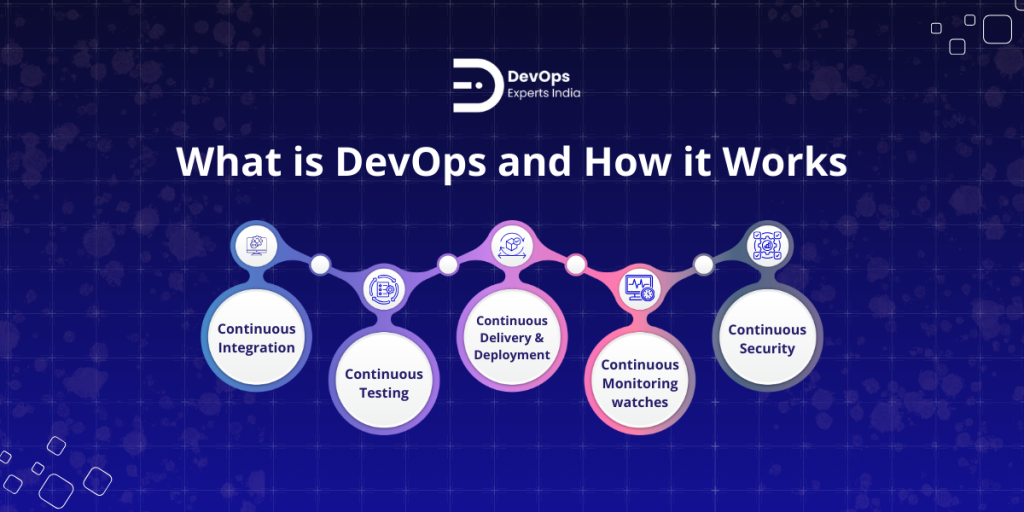
Here’s what that looks like in practice:
Continuous Integration means developers merge their code frequently, sometimes multiple times a day, and every merge automatically triggers a build and a set of tests. Bugs get caught within minutes, not weeks.
Continuous Testing runs automated tests throughout the whole process, not just at the end. Unit tests, integration tests, security scans. All of it, automated.
Continuous Delivery and Deployment means once code passes tests, it’s automatically prepared for release or actually pushed to production without manual steps.
Continuous Monitoring watches your live application for errors, performance dips, and anomalies, sending alerts when something goes wrong.
Continuous Security (often called DevSecOps) bakes security checks into every stage instead of bolting them on at the end.
The real power of DevOps isn’t any one of these steps in isolation. It’s the feedback loop. Monitoring feeds back into development. Testing catches what developers miss. Automation keeps it all moving without human bottlenecks. Companies that use DevOps Automation services properly can see deployment frequency go up by 200x compared to traditional methods, with significantly fewer failures.
| Aspect | Traditional Approach | DevOps Approach |
| Team Structure | Siloed (Dev vs. Ops) | Collaborative, cross-functional |
| Release Frequency | Monthly or Quarterly | Daily or Weekly |
| Error Detection | Late, in production | Early, via automation |
| Tools Focus | Manual scripts | IaC + Automation |
What is Configuration Management Tools in DevOps?
DevOps runs on a toolchain. No single tool does everything, so teams build a stack covering different parts of the lifecycle.
Here are the main categories:
Version Control is where all code lives. Git is the universal standard here. Platforms like GitHub, GitLab, and Bitbucket sit on top of Git and add collaboration features like pull requests and code reviews.
CI/CD Tools automate your builds, tests, and deployments. The popular ones are Jenkins (open source, highly configurable), GitHub Actions (built into GitHub, YAML-based), GitLab CI, Azure DevOps Pipelines, and CircleCI.
Containerization tools package your application so it runs the same everywhere. Docker is the go-to here, and Kubernetes manages containers at scale.
Configuration Management Tools are specifically designed to keep your servers and infrastructure in a consistent, desired state. This is where tools like Ansible, Chef, Puppet, and SaltStack come in.
Configuration management solves what engineers call “configuration drift,” when servers that are supposed to be identical start diverging over time because someone made a manual change on one of them. These tools prevent that by enforcing a defined state automatically.
| Tool | Purpose | Pros | Cons |
| Ansible | Agentless config automation | Simple YAML, no agents needed | Can be slower at large scale |
| Chef / Puppet | Pull-based configuration enforcement | Mature, highly scalable | Steeper learning curve |
| SaltStack | Event-driven orchestration | Very fast, real-time execution | Complex setup |
| Terraform | Infrastructure provisioning (IaC) | Versioned infrastructure, multi-cloud support | Not for application configuration |
If you’re just getting started, Ansible is usually the recommendation. It’s the most approachable, uses plain YAML, and doesn’t require installing agents on every server.
What is a Pipeline in DevOps?
A pipeline is an automated workflow that takes code from the moment a developer commits it and moves it through every stage until it’s running in production.
Think of it as an assembly line for software. Code goes in one end, and a tested, deployed application comes out the other end, without a human manually doing each step in between.
Every time a developer pushes code, the pipeline triggers automatically. It runs through stages in sequence. If any stage fails, the pipeline stops right there and alerts the team. This prevents broken code from ever reaching real users.
A basic pipeline looks like this:
Code Commit → Build → Automated Tests → Package / Create Artifact → Deploy → Monitor
The whole point is that this runs without anyone having to babysit it. Developers can push code and trust the pipeline to either confirm everything works or tell them exactly where it broke.
DevOps CI/CD Pipeline Serviceshelp teams design, build, and maintain these pipelines so they’re reliable, fast, and actually catch real problems before they reach production.
What is the Purpose of a DevOps Pipeline?
The pipeline exists to solve one fundamental problem: getting code into production reliably, quickly, and without surprises.
Before pipelines, deploying software was a high-stress manual process. Someone would follow a runbook, manually SSH into servers, copy files, restart services, and pray nothing broke. One typo or skipped step could take down production.
Pipelines eliminate all of that. The process is codified, repeatable, and automatic. Every deployment works exactly the same way, whether it’s the first one or the thousandth.
On top of that, pipelines reduce the mean time to detect bugs dramatically. Because tests run on every commit, a bug introduced today gets caught today, not six weeks later when it’s tangled up with fifty other changes.
For teams using Continuous Delivery Automation Services, pipelines also become the enforcement layer for quality standards. Security scans, code coverage thresholds, performance benchmarks, they all live in the pipeline and block releases that don’t meet the bar.
What is a Build Pipeline in DevOps?
The build pipeline is a specific stage (or set of stages) within the broader pipeline that focuses on taking raw source code and turning it into something deployable.
A build pipeline typically handles compiling the code into executable form, running unit tests to catch obvious errors, and generating build artifacts, the output files that will actually be deployed.
For example, a Java project going through a build pipeline might produce an app.jar file. A Node.js project might produce a minified dist folder. A containerized app will produce a Docker image. These outputs are the artifacts, the finished packages ready for deployment.
The build pipeline is usually the fastest-running part of the whole system. It needs to be quick because developers are waiting on it. If a build takes 45 minutes, nobody’s going to commit code frequently. Keeping build times low is actually an important DevOps engineering concern.
What is Meant by Artifacts in DevOps?
Artifacts are the output files that come out of a build. They’re the deployable version of your application, the thing that actually gets put onto servers or into containers.
Examples of artifacts include compiled binaries, JAR files, Docker images, npm packages, zip archives of application code, and installer packages.
The key idea behind artifacts in DevOps is “build once, deploy everywhere.” You build your artifact once, validate it thoroughly, and then that exact same artifact gets deployed to staging, testing, and production. You’re not rebuilding from source each time. This removes an entire category of “but it worked on staging” bugs.
Artifacts should be versioned and stored so you can always roll back to a previous version if something goes wrong. That’s your safety net.
What is Artifacts in Azure DevOps Pipeline?
Azure DevOps has a dedicated service called Azure Artifacts. It’s essentially a package feed where you can store and share packages like NuGet, npm, Maven, or Python packages, as well as pipeline artifacts.
In a pipeline context, artifacts work like this: your build stage runs, produces output files, and publishes them as artifacts. Later stages in the pipeline then download and use those artifacts. So your build stage creates a Docker image, publishes it, and your deploy stage picks it up and pushes it to a container registry.
Azure Artifacts separates into two types: Pipeline Artifacts (temporary, used between stages in the same pipeline run) and Build Artifacts (stored longer-term for use across runs and for release tracking). For any serious project, you want both configured properly.
What is Meant by DevOps Engineer?
A DevOps engineer is the person who builds and maintains the system that makes all of this work. They sit at the intersection of development and operations, writing code but also managing infrastructure, building pipelines, and keeping production systems stable.
It’s one of the more demanding roles in tech because the breadth is so wide. On any given day a DevOps engineer might write a Python script to automate a deployment, debug why a Kubernetes pod is crashing, review a Terraform plan, or help a developer figure out why their CI build is failing.
The role doesn’t fit neatly into “developer” or “sysadmin.” It’s genuinely its own thing, requiring enough coding ability to automate complex tasks and enough infrastructure knowledge to understand what you’re deploying to.
What is the Role of a DevOps Engineer?
The core responsibilities of a DevOps engineer come down to a few major areas.
Pipeline design and maintenance. Building CI/CD pipelines that are reliable, fast, and catch real issues. This means choosing the right tools, structuring stages well, and continuously improving them.
Infrastructure as Code. Managing infrastructure using code (Terraform, Ansible, CloudFormation) rather than manual configuration. This makes infrastructure reproducible and version-controlled.
Monitoring and observability. Setting up systems to detect problems before users do. This means Prometheus, Grafana, CloudWatch, or similar tools giving you visibility into what’s happening in production.
Security integration. Working with security teams to embed scanning and compliance checks into the pipeline through DevSecOps Consulting Services rather than treating security as an afterthought.
Cloud cost optimization. Making sure the infrastructure is cost-efficient, not just functional. In cloud environments, a bad configuration can rack up serious bills.
A good DevOps engineer also acts as a force multiplier for development teams. The goal is to make it easy for developers to deploy confidently and self-serve on infrastructure, freeing the ops side to focus on the harder problems.
What is Required for a DevOps Engineer?
Day to day, the breakdown looks roughly like this: troubleshooting pipeline issues takes up the biggest chunk, automating deployments and infrastructure tasks takes up another significant portion, and the rest goes to monitoring, alerting, and cross-team collaboration.
What you need to actually do this job: solid Linux and Bash skills, at least one scripting language (Python is most common), cloud platform knowledge (AWS and Azure are the big ones), Docker and Kubernetes experience, CI/CD tool familiarity, and IaC experience with Terraform or Ansible.
Cloud certifications matter. AWS DevOps Engineer Professional and Azure DevOps certifications are both well-recognized and worth pursuing. They validate that you know the platform-specific tools, not just generic concepts.
Soft skills matter more than people expect. DevOps is fundamentally about collaboration, so communication and the ability to work across teams are genuinely important.
What is Docker in DevOps?
Docker is a containerization platform that packages an application together with everything it needs to run: the code, the runtime, the libraries, the system dependencies. All of it goes into a container image.
The problem Docker solves is environment inconsistency. Before containers, you’d constantly run into “it works on my machine but not on the server” situations. That’s because the developer’s machine and the production server had subtly different configurations. Maybe different library versions, different OS patches, different environment variables.
With Docker, the application runs inside a container that’s identical everywhere. Developer machine, staging, production. Same container, same behavior.
A Docker container is not a virtual machine. It’s much lighter than that. Containers share the host OS kernel and start in seconds rather than minutes. You can run dozens of containers on a single server that would struggle to run two or three VMs.
What is the Use of Docker in DevOps?
In a DevOps context, Docker shows up in a few critical places.
In CI/CD pipelines, Docker images get built as build artifacts. The pipeline builds the image, runs tests inside it, pushes it to a container registry like Docker Hub or AWS ECR, and then the deploy stage pulls it from there.
In microservices architectures, Docker is almost mandatory. Each service runs in its own container, can be scaled independently, and can be updated without touching the others. Even if you use Microservices Consulting Services almost always involve Docker as a foundational piece.
Docker also makes local development much better. Instead of each developer spending hours setting up a local environment, they run docker-compose up and have a full stack running in minutes.
Kubernetes, which manages clusters of containers at scale, is almost always paired with Docker in production environments. Docker handles packaging. Kubernetes handles orchestration.
What is Docker in Azure DevOps?
In Azure DevOps specifically, Docker integrates into Azure Pipelines through built-in tasks. A typical workflow looks like this: your pipeline triggers on a code push, a Docker build task compiles your Dockerfile into an image, another task pushes that image to Azure Container Registry (ACR), and a final task deploys from ACR to your Azure Kubernetes Service (AKS) cluster or App Service.
The YAML for this is fairly straightforward once you’ve done it once. Azure DevOps also supports multi-stage Docker builds natively, which is important for keeping your final images lean. You don’t want your production image carrying build tools and test dependencies that only mattered during the CI stage.
What is DevOps in AWS?
AWS DevOps is simply DevOps practiced using Amazon Web Services as the cloud platform and AWS-native tools for the automation.
AWS provides a full suite of DevOps tools: Code Commit for Git repositories, Code Build for compiling and testing, CodeDeploy for automated deployments, and Code Pipeline for orchestrating the whole flow. Alongside those, CloudFormation handles infrastructure as code, and CloudWatch handles monitoring.
The appeal of AWS DevOps is deep integration. When your application is running on EC2, Lambda, or ECS, using AWS-native pipeline tools means tighter feedback loops and simpler configuration than connecting third-party tools to AWS services.
That said, many teams on AWS still use Jenkins, GitHub Actions, or Terraform because those tools offer more flexibility or their teams already know them well. AWS-native and third-party tools coexist all the time.
For teams using Cloud and DevOps Servicesbuilt on AWS, having someone who knows both
What is an AWS Certified DevOps Engineer?
An AWS DevOps engineer handles all the standard DevOps responsibilities, just in the context of AWS infrastructure. That means building pipelines with CodePipeline or Jenkins on EC2, managing infrastructure with CloudFormation or Terraform, setting up monitoring with CloudWatch, and handling deployments to services like ECS, EKS, or Elastic Beanstalk.
The AWS Certified DevOps Engineer Professional certification is one of the more respected cloud certifications out there. It validates that you can design and manage CI/CD pipelines on AWS, implement monitoring and logging, and automate security and compliance. It’s not an easy exam and it carries real weight in job searches.
Common AWS tools a DevOps engineer works with daily: EC2 (compute), S3 (storage), Lambda (serverless), CloudFormation (IaC), CodePipeline (CI/CD), CloudWatch (monitoring), IAM (security), and EKS or ECS for containers.
What is CI/CD in DevOps?
CI/CD stands for Continuous Integration and Continuous Delivery (or Deployment). It’s the operational backbone of most DevOps implementations.
Continuous Integration means developers integrate their code changes frequently, at least daily, and every integration triggers an automated build and test run. The goal is to catch conflicts and bugs as early as possible. Waiting weeks to merge code leads to painful “merge hell” situations. Small, frequent merges are much cleaner.
Continuous Delivery means the code that passes CI is always in a releasable state. It’s packaged, tested, and ready to go to production at any time. The actual deployment to production might still require a manual approval, but everything up to that point is automatic.
Continuous Deployment goes one step further and removes that manual approval. Every change that passes all tests goes straight to production automatically. This is what Netflix and Amazon do.
| Stage | Focus | Example |
| CI | Integrate and test code | Jenkins builds and tests on every commit |
| CD | Automate release preparation | Code auto-deploys to staging if tests pass |
| Continuous Deployment | Fully automated to production | Every passing commit goes live |
What is CI CD Pipeline in DevOps?
The CI/CD pipeline is the automated sequence of stages that code travels through from commit to production. It’s the technical implementation of CI/CD principles.
A typical pipeline looks like this: developer pushes code to Git, the CI/CD tool detects the push and triggers the pipeline, the code gets built, tests run, a deployable artifact gets created, the artifact gets deployed to a staging environment, more tests run (integration, smoke tests), and if everything passes, it deploys to production.
Each stage has a gate. If tests fail in the test stage, the pipeline stops. The artifact never gets to deployment. This is the fundamental quality guarantee that pipelines provide.
DevOps CI/CD Pipeline Services help teams build these pipelines from scratch or improve ones that are slow, flaky, or not catching the right things.
What is CI/CD Tools in DevOps?
Several tools dominate the CI/CD landscape, and each has its own strengths.
Jenkins is the granddaddy of CI/CD tools. Open source, extremely configurable, with a massive plugin ecosystem. It can integrate with almost anything. The downside is it requires more setup and maintenance than newer tools.
GitHub Actions is deeply integrated with GitHub and uses YAML workflow files. If your code is on GitHub, it’s often the path of least resistance. It’s also quite powerful for more complex workflows.
GitLab CI is similar in approach to GitHub Actions but built into GitLab. Great if your team uses GitLab for source control.
Azure DevOps Pipelines is Microsoft’s offering and integrates beautifully with the rest of the Azure ecosystem. Strong choice for teams already in the Microsoft world.
CircleCI is a cloud-native CI/CD platform that’s fast and developer-friendly, popular with startups and teams that want minimal configuration overhead.
What is CI/CD Process in DevOps?
The CI/CD process is the actual sequence of steps and decisions that happen when code moves through the pipeline.
It starts when a developer pushes a commit. The CI system picks it up and kicks off an automated build. If the build succeeds, automated tests run, unit tests first, then integration tests. Security scans and code quality checks can run here too.
If all that passes, a deployable artifact is created and published. The CD side then takes over, deploying to a staging environment and running further validation. Depending on whether the team uses Continuous Delivery or Continuous Deployment, there’s either an automatic release to production or a manual approval gate before it.
Post-deployment, monitoring kicks in and watches for anomalies. If something unexpected happens, the team gets alerted and can roll back to the previous version.
The whole process, for a well-optimized pipeline, can take fifteen to thirty minutes from commit to production. Teams using continuous delivery automation services often focus heavily on reducing that time while keeping quality high.
What is Azure DevOps and How it Works?
Azure DevOps is Microsoft’s end-to-end DevOps platform. It was previously called Visual Studio Team Services (VSTS), and before that Team Foundation Server. The current name actually fits what it does much better.
It provides a complete set of tools covering the entire software development and delivery lifecycle. You can manage your source code, build and test automatically, track work items, manage packages, and deploy to any environment, all within one platform.
How it works: Azure DevOps gives you integrated services that talk to each other natively. Your code in Azure Repos triggers pipelines in Azure Pipelines. Work items in Azure Boards link to commits and pull requests. Test plans connect to pipeline results. Artifacts from builds feed into release pipelines. It’s designed to be a coherent system rather than a collection of loosely connected tools.
It works equally well for teams deploying to Azure, AWS, Kubernetes, or on-premises infrastructure.
What is Azure DevOps Used For?
Teams use Azure DevOps for the full software delivery workflow. Source control and code review through Azure Repos. Automated builds, testing, and deployment through Azure Pipelines. Sprint planning and backlog management through Azure Boards. Package management through Azure Artifacts. Test case management through Azure Test Plans.
For teams in the Microsoft ecosystem, especially those building .NET applications, deploying to Azure, or using Visual Studio, Azure DevOps is an especially natural fit. But it’s genuinely platform-agnostic. You can use Azure Pipelines to deploy Node.js apps to AWS just as easily as deploying .NET apps to Azure App Service.
Many enterprises use Azure DevOps because of its strong access controls, audit trails, compliance features, and the fact that it integrates with Active Directory for single sign-on.
What is Azure DevOps Tool? Azure DevOps Services, Microsoft Azure DevOps & Other Tools Discussed
Azure DevOps isn’t one tool but a suite of five integrated services.
Azure Repos provides Git repositories with code review through pull requests, branch policies, and protected branches. It supports both Git and the older TFVC version control system.
Azure Pipelines is the CI/CD engine. It supports YAML-based pipelines (code as config, version controlled) and a classic visual editor. It can build on Linux, Windows, and macOS agents and deploy to almost anywhere.
Azure Boards handles agile project management with Kanban boards, backlogs, sprints, and work item tracking. It integrates with GitHub so that code commits and PRs can close work items automatically.
Azure Artifacts is a package management service supporting NuGet, npm, Maven, Python, and Universal packages. Teams publish internal packages here and consume them in builds without relying on public registries.
Azure Test Plans provides manual and exploratory testing tools with traceability back to requirements.
What is Azure DevOps Pipeline?
An Azure DevOps pipeline is a YAML or visually defined workflow that automates your build and deployment process. When you push code to a branch, the pipeline triggers, runs through its defined stages, and either succeeds or fails with detailed logs at every step.
A pipeline example might look like this: code is pushed to main, the pipeline triggers, stage one builds the application and runs unit tests, stage two runs integration tests in a staging environment, stage three requires a manual approval, and stage four deploys to production.
Azure Pipelines supports multi-stage pipelines, environments with approval gates, variable groups for secrets management, and integration with Azure Key Vault for sensitive credentials. Pipelines can deploy to Azure services, Kubernetes clusters, virtual machines, or on-premises servers through deployment groups.
For teams adopting DevOps CI/CD pipeline services, Azure Pipelines is one of the more capable options available, especially at enterprise scale.
What is a Feature in Azure DevOps?
In Azure DevOps, a Feature is a specific work item type in Azure Boards. It sits in the hierarchy above User Stories (or Tasks) and below Epics.
The hierarchy goes: Epic (large initiative) > Feature (deliverable capability) > User Story (specific requirement) > Task (individual work item).
Features represent user-facing capabilities of the product. For example, “User Authentication” might be a Feature containing multiple User Stories like “User can log in with email” and “User can reset password.” This structure makes it easier to track progress on meaningful deliverables rather than just counting individual tasks.
Features link to builds, commits, and test runs in Azure DevOps, giving you traceability from business requirement all the way down to the code change that delivered it.
What is CI/CD Pipeline in Azure DevOps?
A CI/CD pipeline in Azure DevOps combines the CI stages (build and test) and CD stages (deploy) in a single unified YAML file, version controlled alongside your code.
The CI part runs on every commit or pull request: build the code, run unit tests, run security scans, create and publish an artifact. The CD part picks up that artifact and deploys it, first to a lower environment like dev or staging, and then, after validation, to production.
A basic example pipeline might use MSBuild to compile a .NET application, run NUnit tests, publish the output as a pipeline artifact, and then use a deployment stage to push to an Azure App Service. For container-based apps, the build stage produces a Docker image pushed to Azure Container Registry, and the deploy stage uses Helm or kubectl to update a Kubernetes deployment.
What is Ansible in DevOps?
Ansible is an open-source automation tool used to configure servers, deploy applications, and orchestrate complex multi-step workflows. It’s one of the most widely used configuration management tools in the DevOps world.
What sets Ansible apart from some alternatives is that it’s agentless. You don’t install anything on the machines you’re managing. Ansible connects over SSH, runs its tasks, and disconnects. This makes it much simpler to get started with and easier to maintain.
Automation in Ansible is written as playbooks, YAML files that describe what you want a server to look like or what steps you want executed. A playbook might install packages, configure a web server, set up monitoring agents, and deploy an application, all in sequence, all automatically.
What is Ansible Used for in DevOps?
Ansible’s primary uses in DevOps are infrastructure provisioning, server configuration management, and application deployment.
For infrastructure provisioning, Ansible sets up new servers to a known good state. Install the right packages, configure the firewall, set up users and permissions, deploy the application. This is repeatable and reliable in a way that manual setup never is.
For configuration management, Ansible ensures your servers stay in the desired state. If someone manually makes a change on a server that shouldn’t be there, an Ansible run will bring it back in line. This prevents configuration drift.
For application deployment, Ansible can pull the latest artifact, stop the running application, swap in the new version, and start it back up, all across multiple servers simultaneously.
Ansible pairs naturally with Terraform: Terraform provisions the infrastructure (creates the servers, networking, databases), and Ansible configures what runs on top of it. This combination is extremely common in mature DevOps environments.
What is Ansible Tool in DevOps?
Ansible as a tool has a few core concepts worth understanding.
Playbooks are the main automation scripts, written in YAML. They describe tasks to run on specified hosts.
Inventory is the list of servers Ansible manages, organized into groups. You might have groups for web servers, database servers, and cache servers.
Roles are a way to organize playbooks into reusable, modular units. A “webserver” role bundles all the tasks for setting up a web server that you can reuse across different playbooks.
Modules are the building blocks of tasks, pre-built functions for things like installing packages, managing files, starting services, and making API calls. Ansible ships with thousands of built-in modules.
Because Ansible uses plain YAML and SSH, the barrier to entry is lower than Chef or Puppet, which require learning their own DSLs. This is why it’s often the first configuration management tool teams adopt.
What is the Role of Ansible in DevOps?
Ansible’s role in a DevOps workflow is to handle the “what does this environment look like” question. After your CI/CD pipeline builds and tests code, Ansible makes sure the environment the code is deploying into is configured exactly right.
In a CI/CD pipeline, Ansible might run as a step that configures the target server before deployment or executes post-deployment configuration tasks. In an infrastructure-as-code workflow, Ansible playbooks live in the same Git repository as application code, so infrastructure changes go through the same review and testing process as feature work.
For teams modernizing older systems through Legacy system modernization services, Ansible is often a core tool because it can incrementally manage existing infrastructure rather than requiring a full rebuild.
Industries That Have Benefited from DevOps
Finance and Banking: JPMorgan Chase automated their CI/CD pipelines and significantly reduced deployment risk while improving fraud detection speed. The finance industry has strict compliance requirements, and DevOps actually helps here because automated pipelines with built-in security checks are more auditable than manual processes.
Healthcare: Pfizer used cloud-based DevOps practices for vaccine research and development workflows. Healthcare companies use containerized applications to keep patient data secure and compliant with HIPAA while still moving quickly on new features.
E-Commerce and Retail: Walmart adopted DevOps to handle their infrastructure at scale. The result was dramatically fewer system crashes during high-traffic events like Black Friday, and the ability to push updates during peak periods without service disruption.
Telecommunications: Verizon adopted Kubernetes to improve service reliability and accelerate their 5G rollout. Telecom companies deal with millions of concurrent users and need the kind of resilience that kubernetes consulting services and DevOps practices enable.
Common Challenges in DevOps Adoption
DevOps isn’t plug-and-play. Most organizations hit resistance somewhere.
Resistance to change is the most common one. Teams comfortable with their current workflow, even a slow, painful one, push back against automation. The answer here isn’t to force change but to show concrete wins early. Pick a painful manual process, automate it, and show the team how much time it saves.
Tool complexity trips up teams that try to adopt too many tools at once. Start with the basics: Git, one CI/CD tool, Docker. Add more as you need them, not because they seem interesting.
Security risks in automated pipelines are real. An automated system that deploys code without human review can introduce vulnerabilities faster than a manual one. This is exactly why DevSecOps consulting services exist, to bake security into the pipeline rather than treating it as a separate concern.
Skill gaps are significant. DevOps requires a genuinely broad skill set. Certification programs like AWS DevOps Engineer and Azure DevOps certifications help, as do structured boot camps for specific tools like Kubernetes or CI/CD tooling.
The “automation means losing control” fear is worth addressing directly. Automation doesn’t remove control. It enforces it. A pipeline that blocks deployments when tests fail is more controlled than a manual process where someone might skip a step on a Friday afternoon.
Facing DevOps challenges? Get Expert Help with Our
Conclusion
DevOps isn’t a trend anymore. It’s the standard. Companies that haven’t adopted it are competing against teams that deploy daily, catch bugs in minutes, and roll back instantly when something goes wrong. That gap is hard to close through sheer effort.
The good news is that DevOps is learnable and adoptable incrementally. You don’t need to rebuild everything overnight. Start with a CI/CD pipeline for one project. Add Docker. Add monitoring. Each piece compounds on the last.
If your team needs help getting there faster, from pipeline design to cloud migration to full DevOps managed services, working with experienced practitioners makes a significant difference. The concepts are learnable. The implementation details are where things get complicated.
Site reliability engineering services take this even further by applying software engineering principles to reliability and uptime challenges specifically.
Whatever your starting point, the direction is clear: automate, collaborate, iterate, and keep things moving.
FAQs
Q1. What is DevOps and how does it resolve problems?
DevOps bridges software development and IT operations to improve collaboration, reduce the software development lifecycle, and deliver software continuously with high quality. It resolves problems by replacing slow, manual, error-prone processes with automated pipelines that catch bugs early and keep deployments consistent.
Q2. How does automation support DevOps?
Automation is what makes DevOps actually work at scale. It handles testing, building, deploying, and monitoring without manual intervention. This reduces human error, speeds up delivery cycles, and frees engineers to focus on solving harder problems rather than running repetitive tasks.
Q3. How is DevOps different from traditional IT processes?
Traditional IT processes like the waterfall model have development and operations working independently in sequence. Miscommunications are common and project delays are expected. DevOps integrates these teams around shared tooling, shared responsibility, and continuous delivery, so problems get caught and fixed much earlier in the process.
Q4. What is the difference between CI and CD?
CI (Continuous Integration) is about merging and testing code frequently so bugs are caught early. CD (Continuous Delivery or Deployment) is about ensuring that code which passes CI is always ready for production release, and in full Continuous Deployment, gets there automatically.
Q5. Do small companies need DevOps?
Yes, The efficiency gains from automation are actually proportionally larger for smaller teams because every hour saved matters more. A small team running good CI/CD pipelines can ship faster than a larger team without them.
Contact Us
Recent Post

What is Automated Testing in DevOps: Strategies for Success in 2026

Build, Scale, and Manage: Top Tools for Microservices Success

Release Management in DevOps: Process, Tools, Azure & Best Practices

DevOps Lifecycle Explained: Stages, Phases & Best Practices
